Instagram has become one of the most popular social media platforms, known for its emphasis on visual content. With over a billion active users, the platform is a hub for personal brands, influencers, and businesses to showcase their products, services, and stories through photos, videos, and more. As a visual platform, Instagram thrives on high-quality images and videos that engage users and encourage interaction. To ensure your content stands out and performs well, it’s crucial to understand how Instagram’s design and post formats impact the way your content is displayed.
The size of your Instagram posts plays a significant role in determining how your content appears in feeds and on the explore page. Posting the correct dimensions ensures your images and videos look crisp and professional. Using the wrong sizes can lead to distorted visuals, cropped elements, or reduced engagement. In this article, we’ll dive into what size is an Instagram post and how optimizing your post dimensions can boost your visibility and engagement on the platform.
Why Instagram Post Size Matters
The quality of your images plays a significant role in how they perform on Instagram. Instagram’s algorithm favors visually appealing content, and having high-quality, well-sized images can make a major difference in user engagement. When your images are optimized for the platform’s recommended sizes, they appear crisp and clear, helping to grab users’ attention as they scroll through their feeds. Poorly sized images can appear blurry or pixelated, which may turn users away and reduce the likelihood of them interacting with your post.
Using the right image size also ensures that your visuals are displayed as intended, without being cropped or stretched. Instagram’s platform automatically resizes images that don’t meet the recommended dimensions, potentially altering their appearance. By adhering to the ideal post sizes, you ensure your images retain their intended quality and are presented in a way that enhances their visibility and appeal. This clarity and proper formatting not only attract more likes and comments but can also encourage higher shares, helping your content reach a broader audience.
What Size Is Instagram Post?
When posting on Instagram, it’s important to use the correct dimensions to ensure that your content looks sharp and appealing in users’ feeds. Instagram has specific size guidelines that help maintain the quality and clarity of images, allowing them to be displayed correctly.
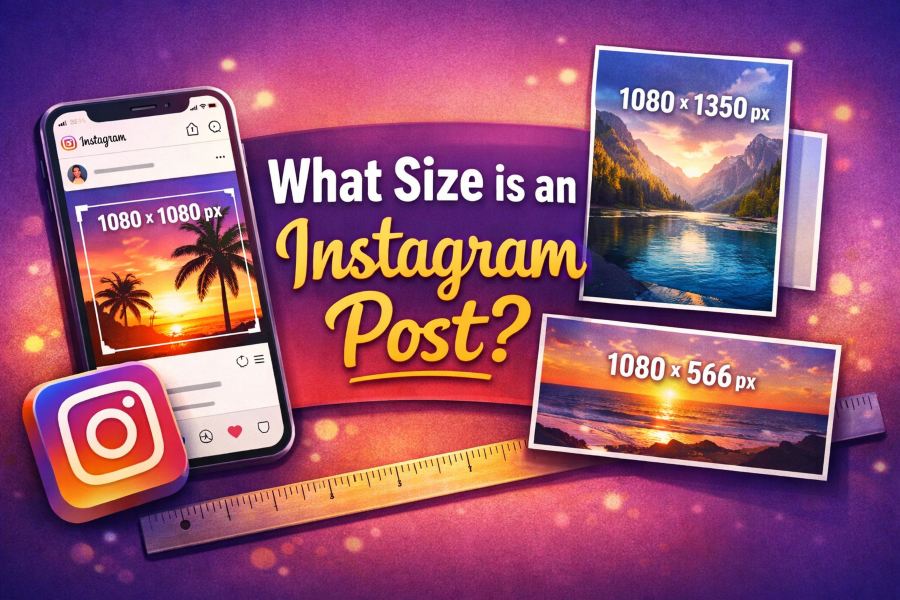
Square Post Size: 1080 x 1080 px
The most common type of Instagram post is the square format. This size maintains a balanced look in the feed and is ideal for both portrait and landscape images when cropped properly. The recommended resolution for square posts is 1080 x 1080 pixels, which ensures the image will appear clear and high-quality without any pixelation. This aspect ratio of 1:1 is the standard for Instagram, and it is important to keep it consistent for the best results.
Portrait Post Size: 1080 x 1350 px
For a more vertical look, Instagram supports portrait-oriented images. The ideal size for portrait posts is 1080 x 1350 pixels. This larger size allows the image to take up more space in the feed, making it more eye-catching and engaging for viewers. Maintaining the 4:5 aspect ratio is essential, as it ensures your image won’t get cropped or distorted by the platform’s automatic resizing.
Landscape Post Size: 1080 x 566 px
If you prefer a horizontal layout for your Instagram posts, the landscape format is the way to go. The recommended size for landscape posts is 1080 x 566 pixels. This format maintains a 1.91:1 aspect ratio and is best used for wide, panoramic shots. It’s crucial to avoid exceeding these dimensions to prevent Instagram from cropping your image or displaying it incorrectly.
Optimal Instagram Post Sizes for Different Types of Posts
Instagram supports a variety of post formats, each with its own recommended dimensions to ensure the best visual presentation. Whether you’re sharing photos, stories, or videos, using the right size can make a significant difference in how your content appears to your followers. Below, we break down the optimal sizes for different types of posts.
Photo Posts
Instagram photo posts come in several formats, and each format has a preferred size to ensure that your images display well in the feed.
Regular Photo Posts
- Recommended size: 1080 x 1080 px (Square).
- Aspect ratio: 1:1 (Square format).
This is the most common type of post on Instagram. A square post gives a balanced, symmetrical look and works well for a variety of content types.
Carousel Posts
- Recommended size: 1080 x 1080 px (Square), 1080 x 1350 px (Portrait).
- Aspect ratio: 1:1 (Square) or 4:5 (Portrait).
Carousel posts allow you to share multiple images or videos in a single post, and maintaining the correct size for each image ensures the entire carousel appears seamless when users swipe through.
Landscape Photo Posts
- Recommended size: 1080 x 566 px.
- Aspect ratio: 1.91:1 (Landscape).
Landscape posts are ideal for wide images such as landscapes, group photos, or any wide-angle shots. Ensure the aspect ratio is maintained for proper display.
Instagram Stories
Instagram Stories are vertical posts that appear at the top of the Instagram feed. These posts differ significantly from regular photo posts in terms of size and layout.
- Recommended size: 1080 x 1920 px.
- Aspect ratio: 9:16 (Vertical).
Instagram Stories are designed to take up the entire screen of a mobile device, so it’s crucial to use the recommended dimensions for a full-screen view. Stories are also temporary and disappear after 24 hours, but they are highly engaging and allow for interactive features like polls, links, and stickers.
Instagram Reels and IGTV
Both Instagram Reels and IGTV support video content, but the recommended dimensions for these formats differ from regular photo posts and stories.
Instagram Reels
- Recommended size: 1080 x 1920 px.
- Aspect ratio: 9:16 (Vertical).
Reels are short-form videos that take up the full screen when viewed on a mobile device, just like Instagram Stories. Using the proper size ensures your video fills the screen without any black bars or distortion.
IGTV
- Recommended size: 1080 x 1920 px (Vertical) or 1920 x 1080 px (Horizontal).
- Aspect ratio: 9:16 (Vertical) or 16:9 (Horizontal).
IGTV allows for longer videos than Reels, and you can choose between vertical and horizontal formats. Vertical videos follow the same size as Stories and Reels, while horizontal videos follow the standard 16:9 format.
Tips for Designing Perfect Instagram Posts
Creating visually appealing Instagram posts is essential for engaging your audience. The key to a perfect Instagram post goes beyond just following the correct size guidelines. It’s about designing content that is eye-catching and well-organized within Instagram’s ideal dimensions. Here are some design tips that will help you craft stunning posts that attract likes, comments, and shares.
1. Use the Right Dimensions
The first step in creating a great Instagram post is ensuring your image fits within the ideal dimensions for your post type. Whether you’re posting a square, portrait, or landscape image, adhering to the proper size ensures your content will be displayed clearly and without unwanted cropping. Following the recommended dimensions for square (1080 x 1080 px), portrait (1080 x 1350 px), or landscape (1080 x 566 px) posts is the foundation for a flawless visual presentation.
2. Focus on Composition
Composition refers to how elements are arranged within your image. To create a balanced and visually appealing post, pay attention to the placement of key elements in your design. Use the rule of thirds, a basic photography technique, where you divide your image into nine equal parts and place important subjects along these lines. This helps create a more dynamic and engaging image. Ensure that the key subject of your post is not hidden or cropped out.
3. Add Proper Padding and Margins
To avoid your content appearing crowded or cut off, include adequate padding and margins around the edges of your posts. Padding refers to the space between the content and the edges of the image. This gives your design room to breathe and makes the post more aesthetically pleasing. Avoid placing important text or images right at the edge of the frame, as Instagram’s cropping can alter how it looks.
4. Use High-Quality Images
Instagram is a highly visual platform, and the quality of your images plays a huge role in engagement. Make sure your photos are high resolution (at least 1080 x 1080 px) to avoid pixelation. Blurry or pixelated images can make your posts look unprofessional, which may lead to lower engagement. Always use clear, crisp images that stand out in the feed.
5. Keep Your Branding Consistent
For businesses and creators, maintaining consistent branding is essential. This includes using your brand colors, fonts, and logos in your posts. Consistent use of design elements across your Instagram posts helps build brand recognition and creates a cohesive feed that is visually appealing. Try to keep your design style aligned with your overall brand identity to maintain a professional look.
Frequently Asked Questions (FAQ)
What is the maximum size for an Instagram post?
Instagram allows images up to 30MB in file size, but the maximum resolution for a photo post is 1080 x 1350 pixels for portrait posts. Larger images will be resized automatically by Instagram, which may impact their quality. To avoid any issues, it’s best to stick to the recommended dimensions for each post type.
How do I resize an image for Instagram?
You can resize an image for Instagram using photo editing software or online tools. Many platforms, like Canva or Adobe Photoshop, allow you to set custom dimensions for your images. To resize for Instagram, ensure that your image fits within the recommended size for square (1080 x 1080 px), portrait (1080 x 1350 px), or landscape (1080 x 566 px) posts. Tools like PicResize and Fotor can also help resize your photos quickly.
Can I post a large image on Instagram without cropping?
Instagram will automatically crop images that are too large or do not meet the platform’s aspect ratio requirements. If you want to avoid cropping, be sure to use the ideal dimensions for your post type. For example, portrait images should be 1080 x 1350 px to ensure they fit perfectly within the feed without any cropping. If you want to post a large image, you may need to adjust it before uploading to fit Instagram’s recommended aspect ratios.
What is the best aspect ratio for Instagram posts?
The best aspect ratio for Instagram posts depends on the type of post you’re sharing:
- Square post: 1:1 aspect ratio (1080 x 1080 px)
- Portrait post: 4:5 aspect ratio (1080 x 1350 px)
- Landscape post: 1.91:1 aspect ratio (1080 x 566 px)
For videos, Instagram Reels and Stories follow the 9:16 aspect ratio. By keeping your content within these dimensions, you ensure that your images and videos are displayed correctly without any unwanted cropping.
Conclusion
Knowing what size is Instagram post is crucial for making sure your content is displayed perfectly on the platform. By following Instagram’s recommended dimensions for different types of posts, such as square, portrait, and landscape formats, you ensure that your images are high-quality and properly aligned. Using the right size not only helps avoid cropping or distortion but also ensures that your posts fit seamlessly into users’ feeds, leading to better engagement and a more professional appearance.
In addition to getting the size right, maintaining the ideal aspect ratio for each type of post contributes to a more polished and visually appealing Instagram profile. Whether you’re posting a single image, carousel, or video, paying attention to what size is Instagram post ensures your content looks its best. Adhering to these guidelines allows you to showcase your creativity while making a lasting impression on your audience.